If you're looking the answer on how to read MS Project .mpp files on Mac OS X, you've come to the right place.
I'll share a software that opens mpp file extension on Mac, as I believe will help many Apple oriented people easily manipulate with Microsoft Project files.
Operating technology is not a barrier.
The software we discussing today is Seavus Project Viewer, It's not an alternative of Microsoft Project, but a comprehensive viewer or reader of Microsoft Project (.MPP) files.
Seavus company developed transparent solution, allowing users to pick a download for their OS.
The Mac OS project viewer app is available to download for individuals and small teams for $9,99 on App Store.
There are good news for companies and larger organizations as well. The company will customize and deloy solution for large teams, which is good from economic perspective.
Why would anyone want to pay for MS Project alternative, if they only need a viewer of Project plans for only a fraction of that cost?
Project Viewer by Seavus has familiar look and feel as MS Project.
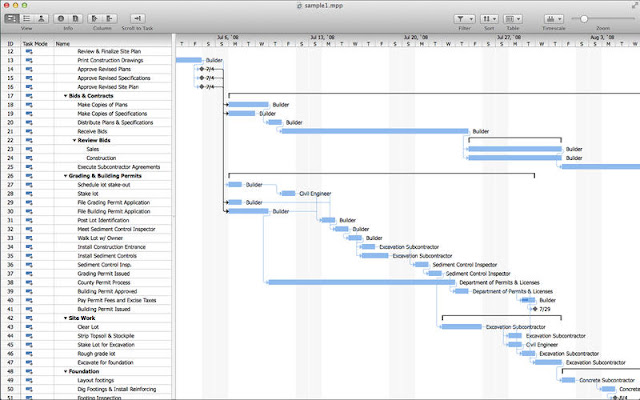
It analyze projects in Gantt Chart, Task Sheet or Resource Sheet view.
The latest version (3.2) for download on the App Store have a support for Mac OSX 10.12 Sierra 3.2.
This is easy way to open and read mpp files your Mac.
If you know any better, feel free to write your comment below.
I'll share a software that opens mpp file extension on Mac, as I believe will help many Apple oriented people easily manipulate with Microsoft Project files.
Operating technology is not a barrier.
The software we discussing today is Seavus Project Viewer, It's not an alternative of Microsoft Project, but a comprehensive viewer or reader of Microsoft Project (.MPP) files.
Seavus company developed transparent solution, allowing users to pick a download for their OS.
The Mac OS project viewer app is available to download for individuals and small teams for $9,99 on App Store.
There are good news for companies and larger organizations as well. The company will customize and deloy solution for large teams, which is good from economic perspective.
Why would anyone want to pay for MS Project alternative, if they only need a viewer of Project plans for only a fraction of that cost?
Project Viewer by Seavus has familiar look and feel as MS Project.
It analyze projects in Gantt Chart, Task Sheet or Resource Sheet view.
The latest version (3.2) for download on the App Store have a support for Mac OSX 10.12 Sierra 3.2.
This is easy way to open and read mpp files your Mac.
If you know any better, feel free to write your comment below.

